Nischal Tiwari

The welcome email that runs itself: wiring Auth0 to OneSignal for cricnepal

How Nepal’s biggest cricket site went from unbranded auth emails and zero email marketing to a fully automated onboarding lifecycle — in one afternoon, with nothing new to host.

It started with a question that sounded trivial: “Do we still run the OneSignal default prompt?”

cricnepal.com — Nepal’s home of cricket coverage — had 174 web-push subscribers and a nagging suspicion. Visitors were seeing two notification prompts: a carefully engagement-gated branded modal the team had built, and, on top of it, OneSignal’s generic dashboard slide prompt firing on every page at the ten-second mark. Nobody remembered turning it on.

Pulling that one thread unravelled something bigger: the site had readers creating accounts every day, and not a single email had ever welcomed them. Worse — the emails they did receive were actively hurting the brand.

The starting point

Here’s what a new cricnepal reader experienced before this project:

  • Verification email from [email protected] — a stranger’s domain, “Powered by Auth0” stamped in the footer, and a verification link pointing at dev-q8ijssilgbpa7t5m.us.auth0.com. Technically functional. Trust-wise, a disaster.
  • No welcome email. Sign up, verify, silence.
  • Duplicate notification prompts stepping on each other.
  • Email addresses captured by the account system (Auth0) sat in one silo; push subscribers sat in another (OneSignal). The two had never met.

The team’s instinct was to reach for the usual fix: stand up a small service, or bolt another workflow onto their n8n automation server, to ferry signups into an email tool. More infrastructure, more credentials to rotate, one more thing to break at 2 a.m. during a live match.

We went a different way.

The idea: let the two platforms talk directly

Both ends of the problem already ran on managed platforms. Auth0 knows the moment a reader signs up. OneSignal knows how to send beautiful lifecycle email. The only missing piece was a handshake — and Auth0 has a native home for exactly that: Actions, small scripts that run inside Auth0’s own infrastructure at defined moments in the login flow.

Twenty-eight lines of JavaScript later, the entire pipeline looked like this:
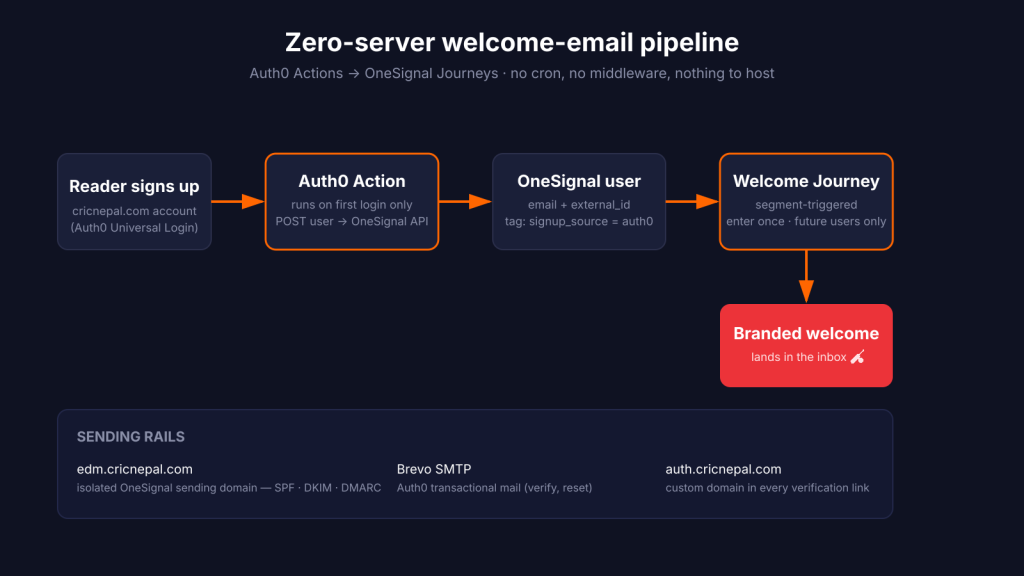
  1. A reader creates an account (email/password or social login — the Action triggers on first login, which covers both).
  2. The Auth0 Action POSTs the new user to OneSignal’s API: email address, a stable external_id (the Auth0 user ID, so push and email unify into one profile later), and a signup_source: auth0 tag.
  3. A OneSignal segment watches for that tag. The moment a user enters it, the Welcome Journey fires: branded welcome email, sent once, never repeated.

No server. No cron. No middleware. Nothing new to deploy, monitor, patch or pay for. If cricnepal’s own infrastructure went down entirely, new readers would still get welcomed.

The details that make it professional

A dedicated sending domain. Marketing email goes out from edm.cricnepal.com — its own SPF, DKIM and DMARC records, isolated from the root domain. A bad spam-complaint day on the newsletter can never poison deliverability for the transactional mail, and vice versa.

Transactional mail re-homed. Auth0’s default sender was replaced with the site’s own SMTP relay, so verification and password-reset emails now arrive from cricnepal <[email protected]> — with a fully branded template: logo, brand red, a proper “didn’t create this account? ignore this” line, and a plain-text fallback link.

The custom domain, everywhere. One overlooked toggle — use custom domains for email notifications — and every verification link went from dev-xxxx.us.auth0.com to auth.cricnepal.com. Small change, outsized trust gain.

A welcome email that onboards, not just greets. Inspired by the best sports-media onboarding (FOX Sports’ “add favorites” pattern), the welcome email doesn’t say thanks for joining and stop. It shows new readers what the account is for: follow your teams and players, track live matches ball-by-ball, follow whole tournaments, play the daily player quiz — each with its own deep link, all funnelling to one primary call-to-action: build your For You feed. Every link carries UTM tags, so analytics shows exactly which hook converts new readers into engaged ones.

What actually went wrong (because something always does)

Case studies that skip the debugging are lying to you. Three things bit us, and each one is a lesson:

1. The silent 400. The Action’s API call was wrapped in a try/catch — but fetch doesn’t throw on HTTP errors. OneSignal had been rejecting every request with 400: app_id malformed (a bad paste in a config secret), and the catch block never fired. The fix was two lines: capture the response, log status + body. The lesson is older than the web: a failure you can’t see is a failure that doesn’t exist — until it’s three test accounts deep. Auth0’s built-in test runner turned the invisible into a one-line diagnosis.

2. The SMTP relay that refused politely. Every Auth0 email silently died with 525 5.7.1 Unauthorized IP address. The SMTP provider’s security settings were IP-allowlisting SMTP calls — fine for a fixed server, fatal for a cloud platform that sends from a rotating pool of addresses. One toggle, fixed. If your ESP supports authorized-IP restrictions, know what’s going to be calling it.

3. The prompt that wouldn’t die. That original double-prompt problem? Deleting the dashboard prompt looked like it worked — but OneSignal’s “Typical Site” mode requires at least one prompt configured, so the save silently failed validation and the generic popup kept firing. The real fix was switching the integration to Custom Code mode, which matches how the site actually initializes the SDK and removes dashboard-driven prompts permanently.

The result

  • Every new reader gets a branded verification email from cricnepal’s own domain, linking through auth.cricnepal.com
  • Minutes after first login, a branded onboarding email lands — teaching follows, live match centre, tournaments and the quiz
  • Push and email identities unify under one profile per reader, ready for cross-channel journeys
  • The duplicate prompt is gone; the only notification ask is the site’s own engagement-gated modal
  • Zero new infrastructure — the whole pipeline lives inside platforms the site already paid for

And the pattern is reusable. Any product running Auth0 (or any IdP with hooks) plus any modern messaging platform can do this: let the platforms talk to each other, and keep your own servers out of the conversation.

namastec is a digital agency in Kathmandu. We build and run cricnepal.com — Nepal’s largest cricket platform — and take on a small number of client projects where product, content and infrastructure meet. Talk to us: namastec.com

Replacing make.com with self-hosted n8n — and teaching cricnepal to wish players happy birthday

For a while, cricnepal‘s social posting ran on make.com. Three scenarios, quietly firing webhooks: publish an article → tweet it, score an over → post the summary, hit a milestone → celebrate. It worked. It also sat behind someone else’s dashboard, on someone else’s pricing, with logic I couldn’t version or grep.

So I moved the whole thing onto self-hosted n8n at automate.cricnepal.com. Here’s how it went, what broke, and the small feature that turned out to be the most fun: a daily bot that wishes Nepal cricketers a happy birthday.

Why bother moving

make.com isn’t bad. But cricnepal already runs its own boxes, and every external SaaS in the critical path is one more login, one more bill, one more black box. n8n is open source, self-hostable, and the workflows are just JSON I can export, diff, and back up. For a site that’s mostly mine to maintain, owning the glue felt right.

The migration itself was almost anticlimactic — and that’s the point of doing it well. Every social target in WordPress was already a webhook URL stored as an option. Repointing make.com → n8n was changing a string, not shipping code. The PHP that builds the payload and fires the request never moved.

The stack, briefly

WordPress  →  outbound webhook  →  n8n  →  Facebook (Graph API)
                                      └─→  X (Buffer GraphQL)

n8n receives the webhook, shapes the caption, and fans out to Facebook and X. Facebook goes direct via the Meta Graph API. X goes through Buffer — more on that below.

The birthday bot

The fun part. Cricket fans love an anniversary, and cricnepal has a database of hundreds of Nepal players with dates of birth. So: every morning at 9am Nepal time, find whoever’s celebrating and post a little tribute.

The constraint made it interesting. The obvious version writes stat-packed copy — “1,948 ODI runs, turns 25 today.” But cricnepal’s match data isn’t 100% complete for every domestic player, and the fastest way to lose trust is to confidently post a wrong number. An LLM left to free-wheel would happily invent records.

So the bot is deliberately humble. A small token-gated WordPress endpoint returns only safe bio fields — name, age, playing role, photo, profile link — for Nepal players whose birthday is today. No stats. n8n fills one of four rotating templates so it doesn’t read like a robot saying the same sentence daily:

🎂 Happy 24th birthday to Kushal Bhurtel! 🇳🇵 The top-order batter celebrates today — wishing the Nepal star a brilliant year ahead! 🏏

One nice trick: only about 18% of player records have a featured photo. Instead of posting faceless text, the bot shares the player’s profile page as a link — so Facebook pulls that page’s og:image and every post gets a visual, photo on file or not.

Where it fought back

No migration is clean. A few things cost me real time, so here they are for the next person:

Cloudflare doesn’t like robots. automate.cricnepal.com sits behind a managed challenge. A browser sails through; curl and server-to-server calls get a 403. Cue twenty confused minutes wondering why my test webhook “didn’t exist” — it existed fine, my client just wasn’t a browser. Lesson: test webhooks from the browser, or after publishing, not from a terminal.

TLS to your own origin. From inside the box, the WordPress hostname resolves to a loopback origin serving a Cloudflare Origin certificate — perfectly valid at the edge, but not in Node’s trust store. The fix is a one-toggle “ignore SSL issues” on the internal HTTP call, but the error message (“unable to verify the first certificate”) sends you hunting in the wrong place first.

Buffer changed its API. I wanted X posting to relay through Buffer (free tier, avoids X’s stingy write limits). Buffer’s classic REST API is closed to new apps now — you can’t even get a client id. The new GraphQL API works on the free plan with a personal key, but it’s a different shape: one channel per call, createPost mutation, shareNow mode. Worth knowing before you copy a 2019 tutorial.

The silent JSON gremlin. Importing an n8n workflow from JSON quietly dropped the Facebook node’s query parameters — so it tried to post an empty message and Facebook rejected it. The node looked fine; the values just weren’t there. And a credential rename once landed my text in the HTTP header name field instead of the title, producing the wonderfully cryptic “Header name must be a valid HTTP token.” Both five-minute fixes once you know; both a while to spot.

Where it landed

Six workflows now run in n8n. Publishing an article posts to Facebook and X. Live-match over-summaries and milestones still fire from the scorer. And every morning, if a Nepal cricketer has a birthday, the site says so — on Facebook and X, with a face and a warm line, and not a single invented statistic.

The bigger win isn’t any one workflow. It’s that the glue holding cricnepal’s social presence together is now mine — exportable, diffable, on my own box, and documented well enough that future-me can fix it at 9am when a birthday post throws.

If you’re running a small site on make.com or Zapier and you already own a server, self-hosted n8n is worth the afternoon. Just test your webhooks from a browser. 🇳🇵🏏


Built on WordPress (headless), n8n, the Meta Graph API, and Buffer’s GraphQL API. cricnepal is Nepal’s cricket home — scores, stats, and now, birthday wishes.

From the scorer’s tap to a live Facebook post: building an over-summary automation

How I wired WordPress, n8n and the Facebook Graph API so one button publishes a cricket over to social — and the page-token gotcha that ate an afternoon.

During a live cricket match, the most valuable thing we can publish is an over that just changed the game — a tight final over, a wicket maiden, a chase that flipped. By the time someone published the score into Facebook by hand, the moment was already gone. I wanted the person scoring the match to be able to publish that over with a single tap, and have a properly written caption land on our Facebook page on its own.

This is the story of how I built that — the plan, the dead end I inherited, the rebuild, and the one authentication detail that cost me an afternoon.

The problem I started with

cricnepal runs a custom live-scoring engine inside WordPress (a mu-plugin we call the cn-engine). The scorer enters every ball; the public match centre reads from it. So the data was already there. What was missing was the bridge to social.

There was an old bridge, technically. WordPress had a settings field — “Live Match Over Summaries” — and a webhook URL sitting in it. I assumed it worked. It did not. When I traced the code, the option was registered and rendered in the admin, but nothing ever fired it. It was dead wiring: a switch screwed to the wall with no cable behind it. The only webhooks that actually POSTed were the on-publish share and a manual alert — neither of which triggered on an over ending.

So I was not fixing a broken feature. I was building one, and inheriting a misleading settings field that made it look solved.

Lesson I keep relearning: “there’s already a field for it” is not the same as “it works.” Grep the trigger, not the setting.

How I planned it

I wrote down three decisions before touching any code.

  1. Operator-gated, not automatic. My first instinct was to fire on every over end. I killed that idea fast — six posts an over-pair, every over, is spam, and it strips away editorial judgement. Instead: the scorer gets a “Post this over” button. It defaults to the last completed over. The human decides which over is worth it.
  2. PHP owns the caption. The old make.com scenario I inherited composed the caption inside the automation tool, using nested formula logic like if(length(batters[2].name) > 0; ...). That is brittle, untestable, and invisible to version control. I decided the WordPress side would compose a ready-to-post caption string and send it. The automation tool would do nothing clever — just take {{caption}} and post it. Belt and suspenders: I’d also send the structured over data, so a future channel could reformat if needed.
  3. The receiver is swappable. WordPress would POST to a configurable webhook URL. Whatever sat on the other end — make.com, n8n, anything — was a config flip, not a code change.

Choosing the receiver: why n8n, not make.com

I prototyped against make.com first because the inherited scenario lived there. Then I hit the wall everyone hits on the free tier: two active scenarios, maximum. I already wanted room for Twitter/X as a second route, plus other automations down the line. Two slots was a non-starter.

I looked at the alternatives and landed on n8n, self-hosted:

  • It’s free for internal use under its Sustainable Use License.
  • I could run it on a box we already pay for — no per-operation credits ticking away.
  • It speaks plain webhooks and has native nodes for the Graph API.

The trade was that I’d own the hosting. Given we already run a Dedicated box behind RunCloud, that was a trade I was happy to make.

The architecture, end to end

Scorer taps "Post this over"
        │
        ▼
WordPress REST  POST /match/{id}/cn-engine/over-summary-share
        │   (builds caption in PHP, reuses the over-summary builder)
        ▼
Outbound webhook  →  https://automate.cricnepal.com/webhook/...
        │   (non-blocking, fail-soft — a social hiccup never stalls scoring)
        ▼
n8n  Webhook trigger  →  Facebook Graph node  →  POST /{page-id}/feed
        │
        ▼
Live post on the cricnepal Facebook page

The two things I care about most in that diagram: the WordPress call is non-blocking and fail-soft (if the webhook is down, the scorer’s match never notices), and the caption is built before it leaves WordPress.

Step 1 — The WordPress side

I added one new file to the cn-engine, over-summary-webhook.php, that does three jobs:

  1. Build the payload. It reuses the existing over-summary builder, so the runs, the ball sequence, the bowler’s figures, and the batters at the crease all come from the same source the match centre already trusts.
  2. Compose the caption in PHP. This is the part I deliberately pulled out of the automation tool. The wording lives in git, where I can read it, test it, and change it in a pull request.
  3. Send it, safely. A non-blocking POST to the configured hook, logging on failure and never throwing into the scoring flow.

Here’s the shape of the caption the function emits:

🏏 Australia vs India
End of Over 10 • AUS 30/5
4 runs • 1 0 0 W 2 1
Zaheer Khan 12/2 (4.0 ov)
Ricky Ponting 18* (22) · Adam Gilchrist 4 (8)
#AUSvIND #LiveCricket

To prove it before anything went near a live page, I ran the builder against a real local match with wp eval and inspected the caption and the structured payload. Composing the text in PHP made this trivial — it’s just a function returning a string, so I could test it without ever calling Facebook.

On the scorer’s screen I added a small post-over-button.tsx component — “Post this over” — that reads the match store, defaults to the last completed over, calls the REST endpoint, and shows the result inline. Nothing fancy. The whole point was that it’s one tap.

Step 2 — Standing up n8n on the box

This is where most of the unglamorous work lived. n8n needed a public HTTPS endpoint, a process manager, and a reverse proxy. On RunCloud, the sequence that finally worked:

  • Created a web app automate.cricnepal.com with Let’s Encrypt SSL.
  • Switched the stack to “Native NGINX + Custom config.” This was the first trap. The default hybrid stack auto-generates an nginx→apache proxy config whose directives collide with the reverse-proxy I needed — nginx refused to reload with a duplicate error. Native NGINX gave me a clean slate.
  • Added a reverse-proxy config pointing nginx at 127.0.0.1:5678, with the websocket upgrade headers n8n needs for its editor.
  • Ran n8n under Supervisor as the runcloud user, with its environment (host, port, timezone, and the all-important N8N_ENCRYPTION_KEY) set in the supervisor config.

Back up the encryption key. Losing it bricks every stored credential. I wrote it down somewhere safe before I trusted anything to it.

Once the public URL returned n8n’s UI over HTTPS, the infrastructure was done. The rest was inside n8n: a Webhook trigger node, and a Facebook Graph node to post to the page feed.

Step 3 — The authentication detail that cost me an afternoon

Everything was built. The button worked. The webhook fired. n8n received it. And Facebook returned:

(#200) This endpoint requires the 'pages_read_engagement' permission
or the 'Page Public Content Access' feature... requires a page access token.

Here is the trap, stated plainly, because I want to save the next person the afternoon I lost:

Posting to a Page’s /feed requires a Page access token — not a user token, and not a system-user token. They look identical. They’re both long opaque strings. n8n’s credential test will even say “Connection tested successfully” with the wrong one, because the test only does a basic GET, and a basic GET passes for almost any valid token. Only a real Page token can actually post.

There’s a second subtlety on top of it: a Page token inherits the expiry of whatever it was derived from. Derive it from a token that expires in 60 days, and your automation silently dies in 60 days.

The fix, and the reason this is now durable:

  1. I used a system-user token, which is non-expiring.
  2. I derived the Page token from it with a single Graph call:GET /{page-id}?fields=access_token&access_token={system_user_token}The access_token that comes back is a non-expiring Page token — because its source never expires.
  3. I pasted that token into the n8n Facebook credential.

A few myths I had to clear along the way:

  • You do not need App Review to post to a Page you own. Business-owned pages skip it. I lost time chasing a review I didn’t need.
  • The Graph Explorer’s “Get Page Access Token” dropdown won’t always surface business-owned pages — a UI quirk. The ?fields=access_token query works regardless.
  • The credential connecting cleanly is not proof it can post. Test the real action, not the handshake.

After that, the scorer tapped the button and End of Over 10 • BNMC 30/5 appeared on the page. End to end. From a tap inside WordPress to a live post, no human in the middle.

What I’d tell myself before starting

  • Trace the trigger, not the setting. A configured field told me a feature existed. The feature did not exist.
  • Put the words in the codebase. Moving caption composition from the automation tool into PHP made it testable, reviewable, and reproducible. Brittle in-tool formula logic is a liability.
  • Make the integration fail-soft. Scoring a live match must never wait on, or break because of, a social post.
  • For Facebook: page token, derived from a non-expiring source. Frame it on the wall.
  • Gate it with a human. Automation removed the labour, not the judgement. The scorer still decides which over deserves the spotlight.

The feature is small — one button, one post. But it closed the gap between the moment a match turns and the moment our audience sees it. That gap was the whole point.

Built for cricnepal. Stack: WordPress (cn-engine mu-plugin), n8n on RunCloud/Hetzner, Facebook Graph API.

How I Built a Bulletproof Abandoned Cart Architecture as a Marketing Automation Developer

As a Marketing Automation Developer, my job isn’t just about writing clean scripts; it’s about translating human behavior into reliable automated logic. In my role at World Vision Australia, I spent a lot of time engineering systems that bridge the gap between user intent and meaningful communication. One of the most impactful systems I worked on was our cart and checkout abandonment architecture.

In the non-profit and e-commerce spaces alike, an abandonment isn’t a flat “no”—it’s a “not right now” or a “life got in the way.” Because a user doesn’t hit a “submit” button when they leave their cart, you can’t rely on standard API requests. You have to capture live behavioral state, manage data pipelines under tight time constraints, and respect user psychology.

Here is how I architected an event-driven, time-delayed abandonment system via APIs, along with the production-ready code patterns I used to make it work.

1. The Core Architecture: Empathy Matched with Event Logic

An abandonment system relies on an event-driven, time-delayed structure. Instead of waiting for a failure to happen, the system tracks when a checkout begins, kicks off a countdown timer, and kills that timer if a successful completion event arrives before the clock runs out.

[User Action: Cart Created / Checkout Started] 
       │
       ▼
[API POST: trackEvent("Checkout Started")] ──► Starts a 1-Hour Delay Window
       │
       ▼
[State Check: Did the user finish the process within 1 hour?]
   ├── YES (Received "Order/Gift Placed") ──► Cancel workflow and exit silently
   └── NO  (No completion matching ID) ──► Trigger Thoughtful Recovery Email/SMS

To make this feel personal and look right to the end-user, your data payload needs to pass three critical pieces of information:

  1. The Identity: Who they are (email or phone number).
  2. The Context: Exactly what they left behind (item names, quantities, values, and images) so we can dynamically rebuild their cart visually.
  3. The Lifecycle Key: A unique cart_id to stitch tracking events together and prevent duplicate notifications.

2. Technical Implementation: The Code Artifacts

Depending on your tech stack, you can either push data immediately from the frontend when an identity is captured, or audit records asynchronously on the backend. Here are the two approaches I built into our pipeline.

Implementation A: Frontend Event Tracking (Push Model)

This script attaches directly to the email input field on the checkout page. The moment a user steps out of the input box (blur event) and a valid email format is recognized, the script immediately dispatches the current state to the automation API. This ensures we capture the lead even if they close the tab three seconds later.

// abandoned-cart-tracker.js

const trackCheckoutStart = async () => {
  const emailInput = document.querySelector('#checkout-email').value;
  
  // Basic validation to avoid firing API calls on partial entries
  if (!emailInput || !emailInput.includes('@')) return;

  // Gather cart details from the application state (e.g., Redux or LocalStorage)
  const cartPayload = {
    event: "Checkout Started",
    email: emailInput.trim().toLowerCase(),
    cart_id: window.crypto.randomUUID(), // Unique tracking state key
    restore_url: `${window.location.origin}/checkout?recover=${window.crypto.randomUUID()}`,
    total_value: 150.00,
    currency: "AUD",
    items: [
      {
        sku: "GIFT-001",
        name: "Child Sponsorship Support Pack",
        quantity: 1,
        price: 100.00,
        image_url: "https://namastec.com/assets/images/support-pack.jpg"
      },
      {
        sku: "GIFT-042",
        name: "Clean Water Community Fund Contribution",
        quantity: 1,
        price: 50.00,
        image_url: "https://namastec.com/assets/images/clean-water.jpg"
      }
    ]
  };

  try {
    const response = await fetch('https://api.your-marketing-tool.com/v1/events', {
      method: 'POST',
      headers: {
        'Content-Type': 'application/json',
        'Authorization': 'Bearer YOUR_PUBLIC_API_TOKEN'
      },
      body: JSON.stringify(cartPayload)
    });
    
    if (response.ok) {
      // Save cart_id locally so we can cancel the flow if they complete the purchase
      localStorage.setItem('active_cart_id', cartPayload.cart_id);
      console.log('Checkout behavioral state captured.');
    }
  } catch (error) {
    console.error('Telemetry pipeline failed:', error);
  }
};

// Trigger when the user clicks away or moves to the next form field
document.querySelector('#checkout-email').addEventListener('blur', trackCheckoutStart);

Implementation B: Asynchronous Server-Side Auditing (Pull Model)

If you want to keep tracking scripts entirely separate from your frontend performance budget, a backend script running on a cron schedule can audit active records and handle the data transmission cleanly.

// cron-abandoned-audit.js
import nodeCron from 'node-cron';
import axios from 'axios';

// Audit the system every 15 minutes for stagnant checkout records
nodeCron.schedule('*/15 * * * *', async () => {
  console.log('Auditing database for abandoned sessions...');
  
  const oneHourAgo = new Date(Date.now() - 60 * 60 * 1000);
  const seventyFiveMinsAgo = new Date(Date.now() - 75 * 60 * 1000);

  try {
    // 1. Fetch records modified between 60 and 75 minutes ago that remain incomplete
    const staleCarts = await db.collection('carts').find({
      status: 'active',
      updatedAt: { $gte: seventyFiveMinsAgo, $lte: oneHourAgo },
      customerEmail: { $ne: null }
    }).toArray();

    for (const cart of staleCarts) {
      // 2. Dispatch payloads directly to your transactional communications engine
      await axios.post('https://api.mailgun.net/v3/YOUR_DOMAIN/messages', 
        new URLSearchParams({
          from: 'Support Team <[email protected]>',
          to: cart.customerEmail,
          subject: 'Ready to make an impact? Your cart is saved.',
          template: 'abandoned_cart_recovery',
          'v:customer_name': cart.customerName,
          'v:cart_restore_link': `https://yourdomain.com/cart/restore/${cart._id}`
        }), {
          headers: { 'Authorization': `Basic ${Buffer.from('api:YOUR_API_KEY').toString('base64')}` }
        }
      );
      
      // 3. Update the database record state so it isn't picked up in the next loop
      await db.collection('carts').updateOne(
        { _id: cart._id },
        { $set: { status: 'abandoned_notified' } }
      );
    }
  } catch (error) {
    console.error('Critical failure running recovery automation loop:', error);
  }
});

3. The “Gotchas”: Resolving Race Conditions & Session Tracking

When you write marketing automation tools at scale, you quickly run into edge cases that turn a great user experience into a frustrating one. Handling these technical hurdles properly is essential.

Eliminating the “Just-In-Time” Race Condition

A user completes an action at minute 59. Your core database writes the success state, but due to minor webhook latency, the “Order Placed” cancellation signal takes two minutes to process over to your marketing platform. If the automation tool evaluates the audience criteria strictly at the 60-minute mark, the user gets hit with a recovery message for something they just bought.

The Solution: I implemented a “Just-In-Time” verification hook. Right before the email server actually hits send, the marketing engine fires an internal API call back to the main data registry (GET /v1/carts/status/:id). If the status returns as completed, the system aborts the send immediately.

Session Stitching & Anonymous Carts

Most people browse anonymously before giving you their email address. If you only start tracking when they log in, you miss the entire journey.

The Solution: Drop a secure tracking cookie with a unique session token the moment an item is added to a basket. Track their cart modifications silently against that anonymous token in your database. The exact millisecond they input an identity token—whether signing up for a newsletter in the footer or entering an email in the checkout flow—run a backend script to merge that historical session ID with their permanent identity record.

. Best Practices for High-Performance Automation

  • Never Use Empty Landing Pages: Always include a restore_url in your payload. If a user clicks your link and finds an empty basket or has to search for items again, the pipeline breaks down.
  • Implement Frequency Capping: Users open multiple browser tabs and test combinations. Ensure your API routes block duplicate entry signals by enforcing a cooling-off rule at the routing layer (e.g., rejecting identical payloads if fired within 5 minutes of each other).
  • Keep Frontend Scripts Non-Blocking: Client-side tracking should never slow down the interface. Use asynchronous execution or navigator.sendBeacon() to handle tracking calls quietly in the background so the user experience stays smooth.

5. Summary Checklists for E-Commerce APIs

System SetupTarget API HookPurpose
Custom Full-StackPOST /v1/events/checkout-startPushes the initial payload to launch the delay timer
Monolith EcosystemsAction Hooks: checkout_order_processedFires the cancellation signal to clear the queue
Headless ConfigurationsWebhook Subscription: checkouts/updateSynchronizes active session changes to your CRM layer

Let’s Chat

Are you building out a custom automation pipeline with direct webhooks, or are you working on connecting pre-built platforms to transactional APIs? Drop your thoughts in the comments!