WCAG, ATAG, UAAG and ARIA explained: a website manager’s field guide to accessibility
What the accessibility alphabet soup actually means — WAI, WCAG, ATAG, UAAG, POUR, ARIA and the A/AA/AAA levels — and how to make WCAG 2.1 AA the default output of a well-run website.
Nischal Tiwari
Website manager · Digital producer
I recently completed the W3Cx Introduction to Web Accessibility course (WAI0.1x), and the biggest thing it confirmed for me is something I’ve believed for years as a website manager: accessibility is not a feature you bolt on before launch. It’s a quality standard that lives in your templates, your publishing workflow and your QA — or it doesn’t live anywhere at all.
The accessibility world is thick with acronyms — WCAG, WAI, ATAG, UAAG, ARIA, A/AA/AAA — and that alphabet soup scares off a lot of teams before they start. So here’s the field guide I wish someone had handed me: what each piece actually is, how they fit together, and what to do about it on a real website.
Start with the people, not the standard
Over a billion people live with some form of disability — visual, auditory, motor, cognitive, or a combination. Add temporary impairments (a broken wrist, eye surgery) and situational ones (bright sunlight, a noisy train, one hand holding a toddler) and “users with accessibility needs” stops being an edge case. It’s your audience on a normal day.
That’s why accessibility is really just user-centred design taken seriously. UCD says: design for how people actually use your product, not how you assume they do. Some of those people navigate entirely by keyboard. Some listen to your page instead of seeing it. Some need twice the contrast you find comfortable. Design for the range, not the average.
WAI: where the rules come from
The Web Accessibility Initiative (WAI) is the group inside the W3C — the body that standardises the web itself — responsible for accessibility. WAI publishes the guidelines, the supporting techniques and the education material (including the course I just finished). When someone says “the accessibility standards”, they almost always mean WAI’s work.
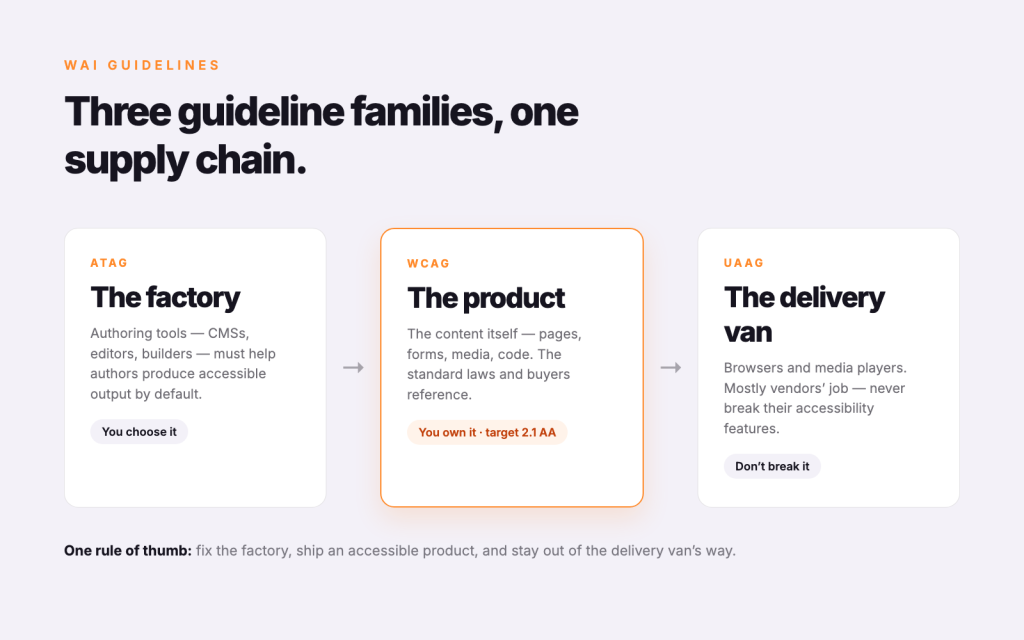
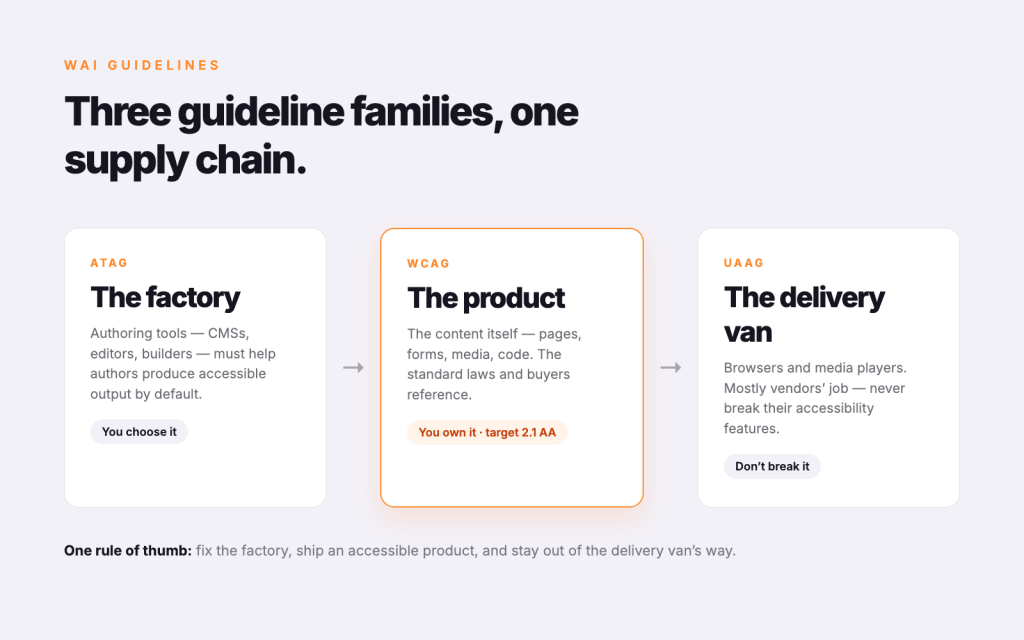
Three guideline families: WCAG, ATAG, UAAG
WAI maintains three sets of guidelines, and they map neatly onto the three things involved in every web experience:
- WCAG — Web Content Accessibility Guidelines. The content itself: pages, text, images, forms, media, code. This is the one you’ll deal with most, and the one laws and procurement policies around the world reference.
- ATAG — Authoring Tool Accessibility Guidelines. The tools that create content — CMSs, page builders, editors. ATAG asks two things: the tool must be usable by people with disabilities, and it should help authors produce accessible output by default. If your CMS makes it hard to add alt text, that’s an ATAG failure upstream of every WCAG failure it causes.
- UAAG — User Agent Accessibility Guidelines. The software that delivers content — browsers, media players and their extensions. Mostly a concern for browser vendors, but useful to know because it explains why some responsibilities (like letting users resize text) are shared between your site and the browser.
As a website manager I think of it as a supply chain: ATAG governs the factory, WCAG governs the product, UAAG governs the delivery van. You control the product directly, you choose the factory, and you should never break the delivery van’s features.
POUR: the four principles behind WCAG
Every WCAG success criterion hangs off four principles. If you remember nothing else, remember POUR:
- Perceivable — users must be able to perceive the content with at least one of their senses. Alt text for images, captions for video, sufficient colour contrast, content that doesn’t rely on colour alone.
- Operable — users must be able to operate the interface. Everything works with a keyboard, focus is visible, nothing traps you, users get enough time, nothing flashes in seizure-inducing ways.
- Understandable — content and controls must make sense. Plain language, predictable navigation, form errors that explain how to fix them.
- Robust — content must hold up across browsers and assistive technologies. In practice: clean, valid, semantic HTML.
A, AA, AAA: what the levels actually mean
Each WCAG success criterion is assigned a conformance level, and the levels stack — you can’t claim AA without meeting every A criterion too.
- Level A is the floor. Miss these and groups of users are simply locked out: images without alt text, video without captions, functionality that needs a mouse, no way to skip repeated navigation.
- Level AA is the working standard. It adds things like a 4.5:1 contrast ratio for body text, visible focus states, consistent navigation, meaningful headings and labels, and text that can scale to 200%. This is the level referenced by most legislation — including Australia’s DDA-driven expectations, the EU’s EN 301 549 and the ADA case law in the US.
- Level AAA is the gold standard — 7:1 contrast, sign language interpretation for media, reading-level requirements. W3C itself notes AAA isn’t achievable for all content; treat it as a menu to pick from where it matters (say, a government form or a health page), not a site-wide target.
My advice: target WCAG 2.1 AA, page-template by page-template. It’s the level regulators expect, the level procurement teams ask about, and — honestly — the level where the biggest usability wins live for everyone, disabled or not.
Assistive technology: who you’re building for
Guidelines exist so that assistive technology (AT) can do its job. The main categories worth knowing:
- Screen readers (VoiceOver, NVDA, JAWS, TalkBack) — convert the page to speech or braille. They navigate by headings, landmarks and links, which is why a proper heading hierarchy is not a styling choice.
- Screen magnification — users see a small slice of the page at high zoom; layouts that break at 200% zoom break for them.
- Alternative input — switch devices, sip-and-puff, eye tracking, voice control. All of them ultimately rely on the same thing: keyboard operability and properly labelled controls.
- Captions and transcripts — for deaf and hard-of-hearing users, and for everyone watching in a quiet office.
The pattern across all of these: AT consumes the semantics of your page, not its pixels. Semantic HTML is the API that assistive technology programs against.
ARIA: powerful, and dangerous in the wrong hands
WAI-ARIA (Accessible Rich Internet Applications) is a set of attributes that add missing semantics to custom widgets — tabs, accordions, comboboxes, live-updating regions — so AT can understand them. role="tablist", aria-expanded, aria-live and friends.
But the first rule of ARIA is famous for a reason: don’t use ARIA if native HTML can do the job. A <button> is focusable, keyboard-operable and announced correctly for free; a <div role="button"> gives you none of that until you rebuild it all by hand — and most people don’t. ARIA describes behaviour to assistive tech; it never creates the behaviour. No ARIA is better than bad ARIA, because bad ARIA actively lies to screen reader users.
Making it operational
Standards don’t ship websites — workflows do. Here’s how I bake this into sites I run:
- Build it into templates. Semantic landmarks, heading hierarchy, focus states, skip links and contrast-safe design tokens live in the theme, so every new page inherits them.
- Build it into the editorial workflow. Alt text is a required field, not a suggestion. Heading levels are structure, not font sizes. Link text says where it goes.
- Test with more than a plugin. Automated checkers (Lighthouse, axe, WAVE) catch maybe a third of issues. The rest need a keyboard-only pass, a screen reader session and a 200% zoom check.
- Audit against WCAG 2.1 AA on a cycle, log issues like any other defect, and fix them in releases — accessibility regressions are bugs, not philosophy.
The web was designed to be universal — that’s not a slogan, it’s the founding requirement of the medium. WCAG, ATAG, UAAG, POUR, ARIA: they’re just the engineering documentation for keeping that promise. Learn the map once, wire it into your operations, and accessibility stops being a scramble before launch and becomes what it should have been all along — the default output of a well-run website.